Kidduca: Kids Learning Games
- 4.3
- Rating
- 10.00K
- Installs
- Free
- Price

 Analysis by App-foxy
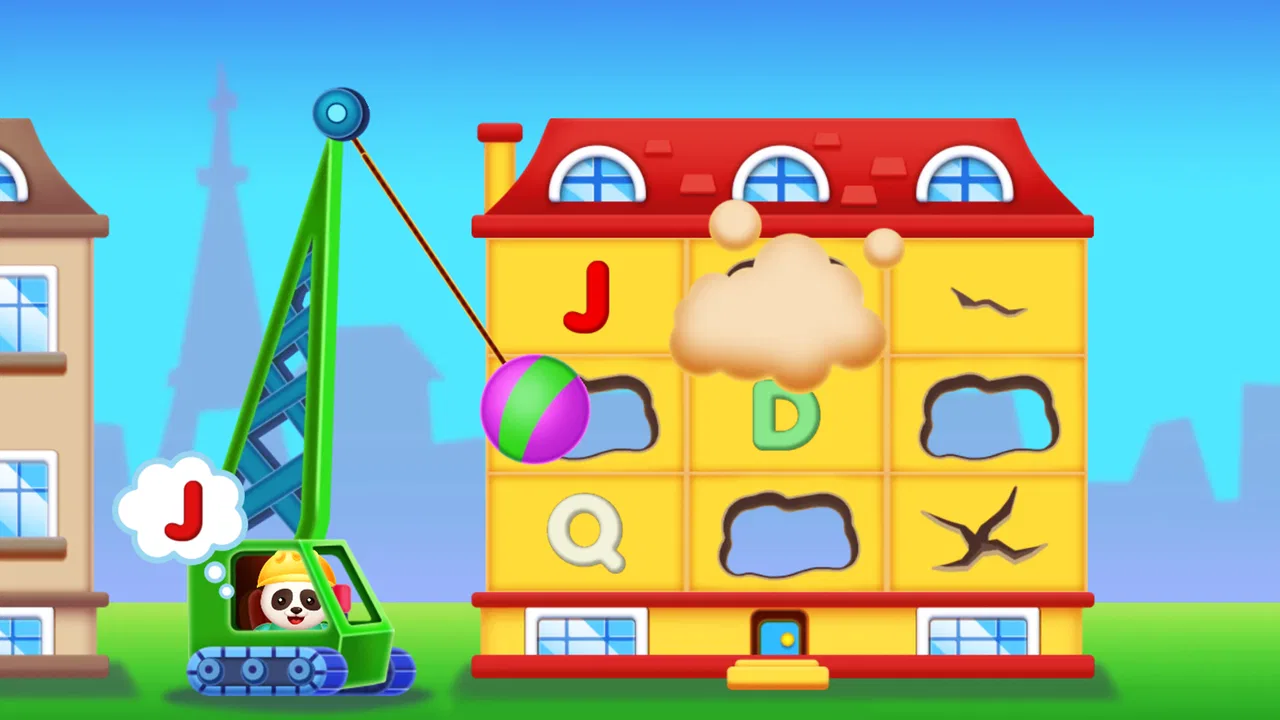
I spent time with Kidduca: Kids Learning Games as an early-learning game for young children, and my first impression was that it aims to make short practice sessions feel more like play than formal teaching. It brings together early ideas such as numbers, letters, shapes, colors, and puzzles, which gives parents a broad starting point when they do not want to install a separate app for every skill.
The app is free to begin with, is rated for Everyone, and is designed for toddlers and young learners from around age two. That combination makes it easy to consider for a shared family device, especially when a child is beginning to recognize symbols and follow simple visual instructions. At the same time, I would not treat it as a complete preschool curriculum. Its best role is a flexible, supervised practice tool that can fill a few quiet minutes and help a child revisit concepts introduced elsewhere.
How the learning experience feels in everyday use
I find the everyday experience works best when an adult treats the game as a starting point for shared discovery, not a hands-off lesson. Choosing one topic before opening it can help a young child stay focused, while a quick follow-up with real objects gives the activity a purpose beyond tapping. That balance matters especially when deciding whether its broad mix is a good fit for your family.
You May Also Like

 Pandora - Music & Podcasts
Pandora’s Music Is Easy to Start, but Harder to Recover
Pandora’s strength is its low-effort path from a seed to a station. Its weak spot is how much confidence it asks you to place in connection, setup, and quiet recovery.

 AccuWeather: Weather Radar
AccuWeather Review: A Quick, Clear Forecast for Everyday Decisions
For everyday plans, the best forecast is the one you can understand quickly. AccuWeather makes rain timing, radar, and local conditions easy to act on, with a few trade-offs.

 Hill Climb Racing
Why Hill Climb Racing Still Turns Crashes Into One More Run
A tiny car, a bumpy hill and one more upgrade: Hill Climb Racing keeps resurfacing because its simple chaos makes every near-miss feel personal.

 AliExpress - Shopping App
AliExpress Makes Global Shopping Feel Personal, but Shoppers Bear the Risk
AliExpress turns a global marketplace into a pocket-sized discovery engine. Its reach is useful, its shopping loop compelling, and its trade-offs easy to miss.

 Lords Mobile: Kingdom Wars
Lords Mobile Is a Kingdom-Building Routine, Not a Quick Match
A case-by-case verdict on the building, battles, device demands, and social commitments that make Lords Mobile rewarding for some players and exhausting for others.

 PDF Scanner app - TapScanner
TapScanner Makes Paperwork Easier to Capture, Check, and Share
TapScanner makes scanning with a phone feel less like a rescue operation and more like a dependable step in getting work done. Its capture tools are useful, though not flawless.
More From Our News Desk
View All News


Readability and navigation for early learners
For a child who cannot read independently yet, visual clarity matters more than long explanations. Kidduca’s subject range is naturally suited to this stage because letters, numbers, colors, and shapes can be introduced through recognition rather than heavy reading. I found that this kind of design is most useful when an adult first shows the child where to begin, then lets the child try the activity without constant verbal direction.
The broad selection is helpful, but it also creates a small navigation challenge. A two-year-old may understand a picture or a colorful button before understanding how the activities are organized. I recommend opening the game with the child and choosing one area at a time instead of handing over the device with no guidance. That simple routine reduces random tapping and makes it easier to notice which concepts hold the child’s attention.
Parents should also pay attention to how their child reacts to the wording and visual prompts. A child who is still developing speech or language may benefit from repeating the names of objects, colors, or symbols aloud while playing. In that situation, the app becomes a prompt for a shared conversation rather than a silent test. I would use it to ask, “Can you find another shape?” or “Which letter did you see?” instead of focusing only on whether the answer was correct.
One practical strength is the variety of topics within a single game. If a child loses interest in letter practice, moving to colors or a puzzle can keep the session positive without switching apps. The trade-off is that variety can make progress harder for an adult to observe. I would keep a simple mental note of the skill being practiced that day, because moving between subjects can feel productive while still giving little repeated practice in one particular area.
Motor and sensory considerations
Touch-based learning can be a good match for children who enjoy pointing, dragging, and selecting objects on a screen. It gives an immediate connection between a hand movement and a visual result, which may help a child understand cause and effect. For younger users, though, precise tapping is still developing. A child may understand the answer but miss the target, press too quickly, or use several fingers at once.
That distinction is important when judging success. I would not assume that an incorrect response means the concept was misunderstood. If a child repeatedly chooses the right object but struggles to touch it accurately, I would sit beside them, slow the pace, and let them try again. A larger device can sometimes be easier for shared play than a small phone, although the best choice depends on the child’s comfort and the family’s setup.
Some children enjoy bright, active screens, while others become tired or distracted by them. I would keep sessions short and watch the child rather than relying on a fixed timer. Signs such as rubbing the eyes, abandoning the activity, or tapping without looking are good reasons to stop. The game can support learning, but it should not become a test of endurance.
For children with different motor, visual, attention, or communication needs, the experience will vary considerably. A child who benefits from visual matching may find the activities approachable, while a child who needs larger controls, slower pacing, spoken guidance, or alternative input may need more adult support. I would describe Kidduca as potentially useful for shared exploration, not as a guaranteed fit for every ability. Families should try a small session and judge the child’s actual response.
Using it in real family situations
A realistic use case is the period before dinner when a parent needs a calm activity for a few minutes. I might choose one topic, sit nearby, and let the child complete a small number of tasks while I prepare food. The value is not simply keeping the child occupied; it is having an easy prompt for talking about letters, counting, or colors afterward. That makes the app more worthwhile than passive screen time, provided the adult remains involved.
It can also work during travel or while waiting for an appointment, but the surrounding conditions matter. A moving car, a noisy waiting room, or a weak grip on a phone can make touch activities frustrating. I would test the game at home before depending on it away from home. Families should also check what is available without a reliable connection before planning to use it in a place where internet access may be limited.
Because the game is aimed at very young children, I would avoid leaving it open as an unsupervised digital babysitter. A child may move into a different activity, repeat an easy task without learning anything new, or become upset after a mistake. A nearby adult can turn those moments into useful guidance: explain the instruction, model one answer, and then let the child try independently.
The free entry point is convenient for testing whether the child likes the format. However, the presence of in-app purchases means I would let an adult handle any upgrade decisions and review the purchase flow before giving a child access. The listed purchase range runs from $6.99 to $55.99 per item, so “free” should be understood as a way to start exploring rather than a promise that every part of the experience costs nothing.
What it offers compared with familiar alternatives
Compared with printed flashcards, Kidduca is more interactive and easier to vary from one short session to the next. A paper activity does not require a battery and may be better for children who need a quieter, less stimulating experience, but it also asks the adult to prepare materials and provide the feedback. The app offers convenience; the cards offer more control over pace and content.
Compared with a general video platform, this game is better suited to active responses. The child is expected to look, choose, and solve rather than simply watch. That does not make it automatically better for every child. Some learners absorb ideas well through songs or demonstrations, while others need physical objects they can hold. I see Kidduca as a useful middle option between passive video and hands-on play.
Compared with a specialized phonics or counting app, its wider collection of subjects is both its appeal and its limitation. It is convenient for families wanting several early-learning themes in one place, but a child needing concentrated support in one area may progress more clearly with a narrowly focused tool. I would choose Kidduca for variety and casual practice, not as the only resource for a specific learning difficulty.
Remaining barriers parents should notice
The biggest barrier is the gap between a young child’s understanding and the physical demands of touch interaction. A child may need help with tapping, swiping, or returning to a previous activity. This is not a flaw unique to this game, but it affects how independently a toddler can use it. I would start with co-play and gradually step back only when the child can navigate without becoming confused.
Another barrier is the difference between recognition and real-world understanding. A child may correctly identify a color on a screen but still struggle to find that color in a room. After a session, I would connect the digital task to something physical: count spoons, sort toys by color, find a circle, or point out a letter on a sign. That extra step is where the app’s practice becomes more meaningful.
Attention differences also deserve consideration. Some children will enjoy switching between topics, while others need a predictable sequence and repeated instructions. If a child becomes unsettled by changing activities, I would choose one subject per session and end with a familiar task. If the child needs movement, I would alternate screen time with a physical game rather than trying to make the app carry the whole lesson.
Language can be another point of friction. Early learners may not understand every instruction, especially if they are learning more than one language or are still developing comprehension. An adult can translate the prompt into familiar words and name the visual choices. I would treat the game as a visual starting point and add spoken explanation, gestures, and real objects when needed.
Who will get the most from it
I think Kidduca is a good match for families seeking a gentle introduction to digital learning, particularly when a child enjoys matching, identifying, and solving simple visual tasks. It is also practical for parents who want several preschool themes available without managing multiple separate downloads. The broad subject mix makes it easy to adapt a session to the child’s mood.
It may be less suitable for a family looking for detailed progress tracking, a structured lesson plan, or intensive instruction in one academic skill. I would also skip it as a primary choice if the child strongly dislikes screens, has difficulty with touch controls that cannot be supported by an adult, or becomes overstimulated by colorful interactive activities. In those cases, blocks, books, puzzles, or physical sorting games may be the better first option.
The developer, Play & Learn: Online Educational Apps for Kids 2–7, clearly focuses on the early-childhood audience. The game has a 4.3 average from around 126 ratings and has passed 10K+ installs, which suggests that it has found a modest audience without making popularity the main reason to choose it. I would pay more attention to the child’s response during a trial session than to the rating alone.
Device and version details worth knowing
Kidduca is available as a free game for Android devices running Android 8.0 or later. Its current version is 1.7.27, so parents using an older phone or tablet should check compatibility before planning around it. On a shared device, I would also make sure the screen is comfortable for the child to view and that the device is protected from accidental changes to other apps.
The Everyone content rating makes the game approachable for family use, but an age label does not replace supervision. Very young children still need help understanding instructions, coping with mistakes, and stopping when they are tired. I would keep the adult in charge of purchases and treat the game as one activity in a larger routine that includes conversation, movement, books, and physical play.
One useful workflow is to decide the learning goal before opening the app. For example, I might choose colors, play briefly, then ask the child to sort two groups of household objects. Another day, I might use a letter activity and follow it with a search for that letter in a picture book. This prevents the session from becoming aimless tapping and gives the child a chance to transfer the idea beyond the screen.
My inclusive verdict
After looking at it through the lens of different abilities and situations, I see Kidduca as a flexible starting point rather than a universal solution. Its mix of early-learning subjects, free entry, and visual interaction can make practice approachable for toddlers who enjoy screen-based exploration. It works best when an adult adjusts the pace, explains unfamiliar prompts, and connects the digital activity to everyday objects and conversation.
The most important strength is its usefulness as a shared learning prompt, not its ability to replace a teacher, parent, book, or hands-on game. That distinction also explains its limitations. Children who need highly specialized instruction, alternative controls, very low stimulation, or a carefully sequenced curriculum may be better served by another resource.
My recommendation is to try it in a short, calm session and observe three things: whether the child can understand the visual goal, whether the touch actions are comfortable, and whether the activity leads to conversation or real-world play afterward. If those conditions are met, Kidduca can earn a place in a young child’s learning routine. If not, choosing a physical or more specialized alternative is not a failure; it is simply a better match for that child.
FAQs for Kidduca: Kids Learning Games
01What is Kidduca: Kids Learning Games?
Kidduca: Kids Learning Games is an educational app designed to help young children learn through interactive activities and playful challenges. It typically combines colorful visuals, simple controls, and age-appropriate exercises covering areas such as letters, numbers, shapes, colors, memory, and basic problem-solving. Its game-based approach is intended to make early learning feel entertaining rather than like formal homework.
02What age group is Kidduca suitable for?
Kidduca is primarily aimed at preschool and early elementary-age children, although the ideal age can vary depending on a child’s reading ability, attention span, and previous learning experience. Younger children may need an adult to explain instructions or help with navigation, while older children may use the activities for practice. Parents should review the available exercises to confirm that the difficulty matches their child.
03Does Kidduca require an internet connection to work?
Some Kidduca activities may be available after the required content has been downloaded, but internet needs can depend on the app version, device, and subscription features. An online connection may be necessary for the first installation, updates, advertisements, account functions, or newly added lessons. Before giving the app to a child during travel, parents should open the main games offline and verify which features remain accessible.
04Is Kidduca safe for children and does it contain advertising or in-app purchases?
Parents should check Kidduca’s current store listing and in-app settings before allowing independent use, because advertising, premium content, and purchase options can change between versions or regions. Enable parental controls and require authentication for purchases on the device. It is also wise to review privacy permissions and any external links, ensuring that children cannot accidentally leave the learning environment or make unauthorized transactions.
05What are the main benefits and limitations of Kidduca?
Kidduca’s main benefit is that it presents foundational learning concepts in short, interactive sessions that can support recognition, memory, coordination, and early problem-solving. The colorful format may help maintain a child’s interest better than repetitive worksheets. However, it should complement—not replace—parent interaction, books, creative play, and school instruction. Some children may also find certain activities too easy, repetitive, or dependent on adult guidance.
Pros
- Bright
- child-friendly visuals make lessons easy to follow.
- Short activities suit young children’s limited attention spans.
- Covers several early-learning topics in one app.
- Simple controls let children play with minimal assistance.
- Progressive challenges help reinforce basic concepts.
Cons
- Some activities may feel repetitive after extended play.
- The app may require in-app purchases for full access.
- Limited content can reduce replay value for older children.
- Parents may need to supervise screen time and task selection.
- Performance may vary on older or lower-end devices.

Kidduca: Kids Learning Games
Gallery